
App report: Adding a shelf to my Mac
sixcolors.com · View original source
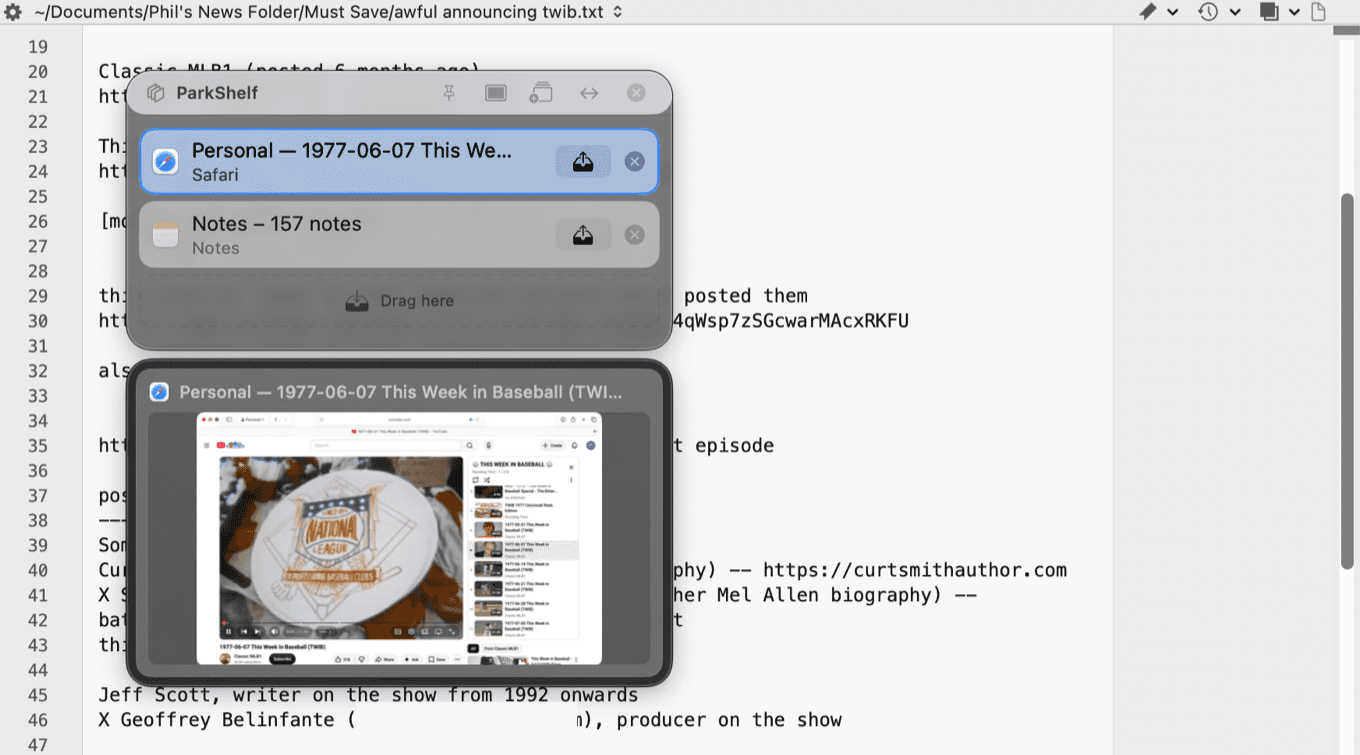
As the tech community gears up for WWDC 2026, a noticeable surge in macOS applications has been observed, largely attributed to the influence of artificial intelligence in app development. Jason Snell of Six Colors highlights this trend, noting that many developers are leveraging AI tools alongside traditional developer kits provided by Apple. This increase in macOS offerings not only enhances the functionality of Apple hardware but also presents exciting opportunities for users seeking to optimize their digital workflows.
In an effort to spotlight these emerging applications, Snell has initiated a series of app reviews aimed at showcasing innovative tools for Mac users. This initiative serves not only to inform but also to encourage developers to share their creations with a wider audience. Users interested in having their apps featured can reach out to Snell directly, fostering a community-driven approach to app discovery.
Spotlight on New Apps
Among the noteworthy applications highlighted is ParkShelf, developed by Digital X Design. This app addresses a common frustration among Mac users: the cluttered screen filled with open windows. ParkShelf introduces a floating bar that users can position anywhere on their screens, allowing them to store open windows in a more organized manner. By using this app, users can declutter their workspace, making it easier to focus on the tasks at hand without the distraction of multiple overlapping windows.
The functionality of ParkShelf is particularly beneficial for users engaged in specific projects. For instance, a writer can utilize the app to keep a window of notes, a research browser page, and data sheets readily accessible while working in a text editor. The free version of ParkShelf allows users to store up to three windows simultaneously, while the Pro version, available for a one-time fee of $6.99, offers unlimited storage and customization options, including the ability to assign a hotkey for easier access.
While ParkShelf is a useful tool, it does have limitations. Currently, it treats each application as a single window, which means that even if multiple web pages are open in Safari, they are stored collectively rather than individually. Nonetheless, the free version provides a valuable solution for users looking to manage their open windows more effectively.
Another innovative app mentioned is ScrollPods, which allows users to control scrolling on their Mac by tilting their heads. This free utility is compatible with various AirPods models and offers a unique accessibility feature that can enhance the user experience. Although mastering the head tilt for scrolling may require some practice, it represents a clever use of existing technology to improve usability for those with mobility challenges.
Additionally, Sleepr is a $5 application that functions as a sleep timer, enabling users to schedule shutdowns after designated intervals or at specific times. The latest update introduces features such as Liquid Glass support, recurring bedtimes, and a live countdown in the menu bar, making it a practical tool for users who want to manage their Mac’s power settings more efficiently.
Lastly, the Senqu Image Converter, priced at $5, allows users to convert images between various formats, including JPEG, PNG, HEIC, TIFF, and PDF. The recent update enhances its functionality by enabling users to drag and drop images for quick conversions, streamlining the process of managing image files.
Why it matters
The emergence of these applications underscores the evolving landscape of macOS development, driven in part by the integration of artificial intelligence. For creators and technologists, this trend signifies a shift towards more user-friendly and efficient tools that cater to specific needs. The ability to access a wider range of applications enhances productivity and allows users to tailor their digital environments to better suit their workflows.
Moreover, the spotlight on innovative applications like ParkShelf and ScrollPods highlights the importance of accessibility in technology. As more developers create tools that accommodate diverse user needs, the overall experience for Mac users can improve significantly. This trend not only benefits individual users but also encourages a more inclusive approach to app development, fostering creativity and innovation within the tech community.
As the tech community anticipates WWDC 2026, the growing interest in macOS applications serves as a reminder of the potential for innovation in software development. With more tools available to enhance productivity and accessibility, users are empowered to make the most of their Mac experience, paving the way for a more organized and efficient digital workspace.
Frequently asked questions
- What is ParkShelf?
- ParkShelf is an app that allows Mac users to organize open windows by storing them in a floating bar, helping to declutter the workspace.
- How much does the Pro version of ParkShelf cost?
- The Pro version of ParkShelf costs a one-time fee of $6.99 and offers unlimited storage for open windows.
- What features does the ScrollPods app provide?
- ScrollPods allows users to control scrolling on their Mac by tilting their head, making it an innovative accessibility tool for users with mobility challenges.
Related stories
AI & art news in your inbox, daily
The day's top stories, summarized. Free, no spam, unsubscribe anytime.