
10 Essential Photoshop Plugins That Will Transform Your Workflow
Designer-daily.com · View original source
Adobe Photoshop is a powerhouse in the realm of digital design, yet its vast array of features can often feel overwhelming for users. To enhance the functionality of this already robust tool, a variety of plugins can be employed. These extensions not only add new features but also automate tedious tasks, ultimately unlocking creative possibilities that would otherwise take hours to achieve manually. This article delves into ten essential Photoshop plugins that can significantly transform your workflow, whether you are a seasoned professional or a budding creator.
Essential Plugins for Enhanced Workflow
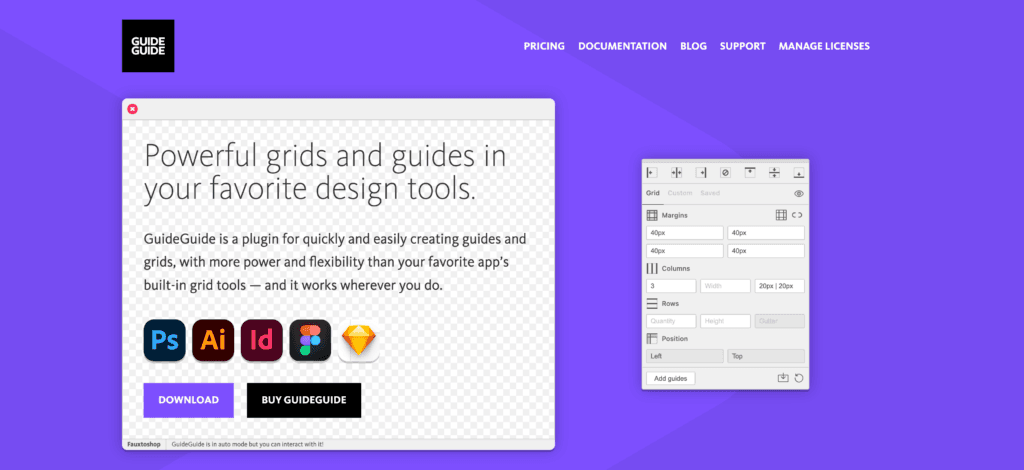
One of the most critical aspects of layout design is the use of grids. GuideGuide is a plugin that eliminates the manual tedium associated with dragging rulers and calculating columns. With pixel-perfect precision, GuideGuide allows users to create rows and columns, find midpoints, and even generate grids based on selected elements. Additionally, it offers the convenience of saving favorite configurations for future projects, streamlining the design process.
For those looking to integrate advanced artificial intelligence into their Photoshop workflow, Luminar is a standout option. Available as both a plugin and a standalone application, Luminar excels in tasks such as color correction, contrast adjustments, object removal, and skin retouching. The AI-driven capabilities of Luminar ensure that results appear natural rather than over-processed, making it an invaluable tool for photographers and designers alike.
The Shutterstock extension is another noteworthy addition, allowing users to search, preview, and license royalty-free images directly within the Photoshop workspace. This functionality eliminates the need to switch between browser tabs or download files before determining their suitability, thereby enhancing efficiency and workflow.
Masking intricate subjects, particularly hair, fur, or detailed elements, can be one of the most labor-intensive tasks in Photoshop. Fluid Mask 3 addresses this challenge by simplifying the masking process. It delivers cleaner edges and more accurate masks in a fraction of the time, making it a worthwhile investment at a cost of €79 (excluding tax).
The Nik Collection is a comprehensive bundle of powerful editing tools that includes features for filters, color adjustment, HDR image creation, noise reduction, and elegant black-and-white conversion. A unique aspect of this collection is its “U Point” technology, which allows users to select specific areas of an image for adjustment without the need for manual masking. This localized editing capability makes the process faster and more intuitive.
For designers looking to incorporate 3D elements into their work, PixelSquid provides access to a vast library of 3D objects. Users can rotate these objects 360 degrees and place them directly into their compositions. Each object comes pre-textured, with adjustable lighting and perspective, facilitating realistic integration without requiring any prior 3D modeling experience.
Vexus Digital offers a suite of custom plugins designed to enhance the creative process while maintaining system performance. Unlike traditional design templates that can be cumbersome, these tools add effects, textures, and creative features without bogging down the workflow or increasing file sizes.
Translating Photoshop styles into CSS has historically been a cumbersome task. CSS Hat 2 addresses this issue by generating CSS3 code that matches your design with a simple selection of any layer. It also supports Less and Sass, producing clean, production-ready output that can save developers valuable time.
ON1 Effects brings hundreds of presets and over 30 stackable filters into the Photoshop environment. With the addition of new generative AI tools, users gain even more creative control, allowing for the application of cinematic color grading, dramatic black-and-white treatments, or unique textures and borders in mere seconds.
Installation and Benefits of Extensions
Extensions in Photoshop serve to add new panels, actions, or shortcuts, enhancing the user experience. There are two primary methods for installing these extensions: via Adobe Exchange or through third-party websites.
Using Adobe Exchange, users can browse available extensions, select either free or paid options, and install them automatically into Photoshop. Alternatively, extensions from third-party websites typically come as executable files or compressed zip files. For executable files, users simply run the installer and follow the prompts, while zip files require extraction and placement into Photoshop’s extensions directory. After restarting Photoshop, the new extension will appear in the Window > Extensions menu.
The integration of extensions into your workflow can save significant time by automating repetitive tasks, adding professional-grade tools, and unlocking creative possibilities that would otherwise require complex workarounds. Whether you are in need of better masking capabilities, instant CSS generation, AI-powered retouching, or 3D object integration, the right plugins can help you focus on the creative work that truly matters.
Peter Makeshoff, the founder and main author of Designer Daily, emphasizes the importance of these tools in enhancing the creative process and improving overall efficiency in Photoshop.
Frequently asked questions
- What are Photoshop plugins?
- Photoshop plugins are extensions that add new features or automate tasks within Adobe Photoshop, enhancing its capabilities.
- How do I install Photoshop plugins?
- You can install Photoshop plugins via Adobe Exchange or by downloading them from third-party websites, following the provided installation instructions.
- What is the benefit of using plugins in Photoshop?
- Using plugins in Photoshop can save time, improve efficiency, and unlock new creative possibilities that would otherwise require complex manual processes.
Related stories
AI & art news in your inbox, daily
The day's top stories, summarized. Free, no spam, unsubscribe anytime.